
Items filtered by date: December 2015
Cannot login to phpMyAdmin via cPanel
In cases where it asks you to login after opening phpMyAdmin from cPanel, it's due to MySQL and cPanel passwords becoming un-synced. One way to update both the cPanel and MySQL passwords is to update the cPanel password from WHM or cPanel. This can also be accompanied by a #1104 error.
Generally speaking when you change the cPanel password the MySQL password is changed aswell, the password sync for the MySQL user is done during the password change for the Cpanel. The password sync might take up to 15 minutes.
In cPanel v11.54+ there is no separate setting to sync the MySQL password. The option was rolled into the cPanel password change itself. When changing the password for cPanel, it will update your MySQL password automatically. It ensures that when you change the cPanel password, it will still automatically log you into phpMyAdmin when it is clicked on from cPanel.
If it does not update properly from cPanel, you can force a full update from WHM > Account Functions > Password Modification. This is something that will need to be done for all accounts effected.
Change MySQL Password via WHM (root) - Preferred Method and verified
You can change the MySQL user's password in the WHM (logged in as root).
- login to http://whm.yourcpanelserver.com/ as root
- Goto: WHM >> SQL Services >> Change MySQL User Password
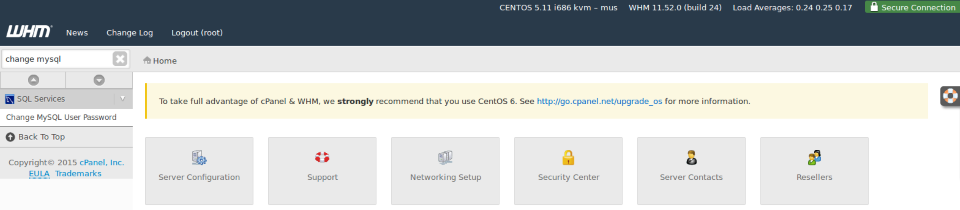
- Select the main MySQL User for the account you want to fix, this will be the same as the cpanel account name (i.e. bookkee6), not a database user (i.e. bookkee6_test).
- Enter the current cpanel password
- Change password
- Done
You now have access to phpmyadmin as normal.
Not sure what this is below, but might be related to this.
- Force a full update from WHM >> Account Functions >> Password Modification
Change cPanel Password in cPanel
- Log into cPanel
- Change your cPanel password to anything random
- Change your cPanel password password BACK to your OLD password, and make sure you have the Synchronize MySQL password box ticked.
* Synchronize MySQL password box might not exist in newer version of cPanel.
pwsync / Password Sync
This needs to be done by your server provider? Not 100% what this is.
Change cPanel Password via WHM (non-root)
- Goto Account Functions > Password Modification.
- Change the password
- After setting the password, it should output text saying the MySQL password was also changed.
root MySQL password
To change the root MySQL password, you would change the password for root itself on the server.
Alternative Options
Login in with the database details
In emergencies you can login using the database username and password.
Application stuck running as administrator even though the admin flag is not set
My xampp control panel was forced to run as an administrator but this option was greyed out (probably because i am not an admin) so i could not revoke the admin privileges.
I clicked on change settings where it prompted me for admin details which i entered, but when i got to the setting 'run as admin' it was not ticked, so i ticked, saved, then unticked and and saved again. this made no difference.
I seached my files for related shortcuts to see if there was a shortcut with the admin flag set there that I had missed. I discovered a shortcut is not needed because windows saves the settings for the binary in the registry.
Solution
I searched the registry for the full path path of the binary:
D:\Documents\websites\design\xampp-control.exe
and it was found in this location (note current user):
HKEY_CURRENT_USER\Software\Microsoft\Windows NT\CurrentVersion\AppCompatFlags\Layers
I have exported this:
Windows Registry Editor Version 5.00

[HKEY_CURRENT_USER\Software\Microsoft\Windows NT\CurrentVersion\AppCompatFlags\Layers]
"C:\\Program Files\\COMODO\\COMODO BackUp\\CBU.exe"="RUNASADMIN"
"D:\\xampp\\xampp-control.exe"="RUNASADMIN"
"D:\\websites\\xampp-control.exe"="RUNASADMIN"
I then deleted the entries that were present, which all were 'RUNASADMIN', this removed the 'run as administrator flag'
I then re-added the xampp control panel to 'run as administrator' and serached for that which then appeared in the new following location (note local machine):
HKEY_LOCAL_MACHINE\SOFTWARE\Microsoft\Windows NT\CurrentVersion\AppCompatFlags\Layers
I cannot also delete these further entries because it comes up with the error so i will recommend running a registry checker. You probaly should be runnign as an adminstrator to delete some of these settings in HKEY_LOCAL_MACHINE
I have exported the second itteration of the key:
Windows Registry Editor Version 5.00

[HKEY_LOCAL_MACHINE\SOFTWARE\Microsoft\Windows NT\CurrentVersion\AppCompatFlags\Layers]
"C:\\Program Files\\VLC\\vlc.exe"="DISABLEUSERCALLBACKEXCEPTION"
"C:\\Program Files (x86)\\HP\\Digital Imaging\\Fax\\Fax Driver 0.6 Base\\hppfaxprintersrv.exe"="DISABLEUSERCALLBACKEXCEPTION"
"D:\\Documents\\Projects\\internet tv\\MaxTV2.0.5\\MaxTV2.0.5.exe"="WINXPSP2"
"D:\\Documents\\My Software\\Programs (not diagnostic)\\Divx, DVD, MPEG, CODECS, CD Burning Optical Image Mounting\\Converters\\avs\\AVS Video Converter v8.5.1.551 and AVS.All.Products.Activator.2014.MPT\\avs4you.all.products.activator.2014.(v1.3)-mpt.exe"="VISTASETUP RUNASADMIN"
I searched for another program (C:\Program Files (x86)\HP\Digital Imaging\Fax\Fax Driver 0.6 Base\hppfaxprintersrv.exe) that i founds in the list and it pointed me to
HKEY_USERS\S-1-5-21-3967016955-2814433979-2222813177-1000\Software\Microsoft\Windows NT\CurrentVersion\AppCompatFlags\Compatibility Assistant\Persisted
why should i use wordpress with WHMCS
Hi QuantumWarp,
Thanks for interest in my works. Let's say, whmcs is a good billing system, but has no any ability on content management. If you use whmcs only manage your bills, that's fine. However, that could be a nightmare if you use whmcs to manage your website. Without the ability on content management means you've hard-code your template files line by line for any changes. Meanwhile, WordPress is the most popluar cms on the market for years. Not only because how that friendly to maintenance or how that search engine friendly. But you can found thousands of useful plugins for WordPress which can help improve the system whatever you want.
The bundled package includes one WordPress theme and the WHMCS template 'Responsio+'. You can use it as an out-of-the-box solution to setup your website by integrate WordPress and whmcs. Without the Responsio template, the standalone WordPress theme is no different than all other WordPress theme. That doesn't has any ability to connect WordPress with whmcs. Usually my customers take the standalone theme because they already has the Responsio template but just want to have a new look.
In fact, the Responsio template can run standalone as a pure whmcs based template without WordPress.
-> http://demo.whmcsconnect.com/whmcs/clientarea.php?theme=standalone
Or you can integrate it with any other third-party themes by purchase the optional add-on imSync. Enclosed is another few demos which show you how Responsio work with other third-party themes :
http://demo.whmcsconnect.com/wordpress/enfold/
http://demo.whmcsconnect.com/wordpress/startup/
http://demo.whmcsconnect.com/wordpress/avada/
http://demo.whmcsconnect.com/wordpress/twentyfourteen/
http://demo.whmcsconnect.com/html/fivelayer/
http://demo.whmcsconnect.com/testdrive/the7/
#2002 - No connection could be made because the target machine actively refused it
When you start your Xampp server you ge the floowing error:
#2002 - No connection could be made because the target machine actively refused it.
Stop and start the mysql service. It is most likely caused by a bad shutdown and restarting the service seems to fix the issue.
Change default collation in phpMyAdmin
in phpmyadmin to get utf8_general_ci as default collation:
- Open phpMyAdmin
- Goto home/variables/character
- Change latin1 to utf8
I need to verify this.
Page title is being shown instead of Page Heading
My solution was orginal posted on the joomlashine forum here.
If I modify your instructions to below they work:
Menu Item -> Page Display Tab -> Show page heading -> No
Menu Item -> Options Tab -> Show Title -> Show
My Notes:
'Show Page Heading' option
This option allows you to display a page title based on the menu item and it works as follows. If enabled it will try and display each of the items in order, if one does not exist, it moves to the next:
Page Heading --> Browser Page Title --> Menu Title
To fix my problem:
Per Menu Item
Enter a Page Heading
or
Menu Item -> Page Display Tab -> Show Page Heading -> No
Menu Item -> Options Tab -> Show Title -> Show
* this will use the articles title
Set Options Globally
Global Configuration --> Articles --> "Show Tile" = Show
Global Configuration --> Menus Manager --> "Show Page Heading" = No
* this will use the articles title
Assumptions
I have all article display options (Global Configuration --> Articles) set to Off or do not display. I find this is a neater way to build small websites.
My SPAM Notes
- if an email is sent from an authenticated account, this reduces the chance of the email sent getting tagged as spam
- sending an email that is signed reduces an emails spam score
Change Joomla 3 page title and site name separator from '-' to '|'
in the Joomla admin
- Extensions --> Language Manager
- Select the language you want to alter i.e. English (en-GB) (you might not need to do this but it does not harm)
- Click Overides
- Click New
- Change 'Search For' to search Constant
- paste or type JPAGETITLE
- Click on the JPAGETITLE highlighted area that appears below
- Replace '-' with '|'
- Click Save and Close
The '-' is now overided for '|' for that language only and with no core file alterations. This is also only for the Frontend.
Links
Typography
This is a single page for all of the basic Typography features of the Joomlashine templates. When a section gets big enought it will be moved to it's own page and that is why you might not see it here.
Table
This is a full and correct example of a Joomlashine table with a coloured header and odd rows coloured. There is an even class for rows but I prefer just to have the odd rows coloured and then I have centered the table to make it look nice. Joomlashine templates offer several table stylings that can be easily changed, this is but one of them but the basic cade apart from a few CSS classes is the same.
- Yes: √
- No: ×
| Monday | Tuesday | Wednesday | Thursday | Friday | Sat - Sun | ||
|---|---|---|---|---|---|---|---|
| Guide Only | All Prices in £ | ||||||
| Arwen | 280 | 375 | 240 | 240 | 460 | 665 | |
| Croglin | 270 | 360 | 230 | 230 | 430 | 630 | |
| Evelyn | 170 | 225 | 140 | 140 | 270 | 420 | |
| Gwendoline | 180 | 240 | 150 | 150 | 290 | 455 | |
| Ruby | 150 | 195 | 130 | 130 | 220 | 350 | |
<table border="1" class="table-style style-colorheader" style="margin: auto auto;" cellspacing="0" cellpadding="0"> <thead> <tr> <th style="text-align: center;" width="81"> </th> <th style="text-align: center;" width="81">Monday</th> <th style="text-align: center;" width="81">Tuesday</th> <th style="text-align: center;" width="81">Wednesday</th> <th style="text-align: center;" width="81">Thursday</th> <th style="text-align: center;" width="81">Friday</th> <th style="text-align: center;" width="81">Sat - Sun</th> </tr> </thead> <tfoot> <tr> <th>Guide Only</th> <td colspan="7">All Prices in £</td> </tr> </tfoot> <tbody> <tr> <th style="text-align: center;" width="81">Arwen</th> <td style="text-align: center;" width="81">280</td> <td style="text-align: center;" width="81">375</td> <td style="text-align: center;" width="81">240</td> <td style="text-align: center;" width="81">240</td> <td style="text-align: center;" width="81">460</td> <td style="text-align: center;" width="81">665</td> </tr> <tr class="odd"> <th style="text-align: center;" width="81">Croglin</th> <td style="text-align: center;" width="81">270</td> <td style="text-align: center;" width="81">360</td> <td style="text-align: center;" width="81">230</td> <td style="text-align: center;" width="81">230</td> <td style="text-align: center;" width="81">430</td> <td style="text-align: center;" width="81">630</td> </tr> <tr> <th style="text-align: center;" width="81">Evelyn</th> <td style="text-align: center;" width="81">170</td> <td style="text-align: center;" width="81">225</td> <td style="text-align: center;" width="81">140</td> <td style="text-align: center;" width="81">140</td> <td style="text-align: center;" width="81">270</td> <td style="text-align: center;" width="81">420</td> </tr> <tr class="odd"> <th style="text-align: center;" width="81">Gwendoline</th> <td style="text-align: center;" width="81">180</td> <td style="text-align: center;" width="81">240</td> <td style="text-align: center;" width="81">150</td> <td style="text-align: center;" width="81">150</td> <td style="text-align: center;" width="81">290</td> <td style="text-align: center;" width="81">455</td> </tr> <tr> <th style="text-align: center;" width="81">Ruby</th> <td style="text-align: center;" width="81">150</td> <td style="text-align: center;" width="81">195</td> <td style="text-align: center;" width="81">130</td> <td style="text-align: center;" width="81">130</td> <td style="text-align: center;" width="81">220</td> <td style="text-align: center;" width="81">350</td> </tr> </tbody> </table>
Content Columns / Grid Colum Layout
This is the syntax for using Joomlashines inbuilt column system. You can set as many columns as you want.
<div class="grid-layout">
	<div>Text in column 1</div>
	<div>Text in column 2</div>
	<div>Text in column 3</div>
</div>
Blockquotes
Blockquote 1
This is a nice Blockquote from JSN Air
Every company should be this way
Outstanding Products, Outstanding Support, Outstanding Business Ethics...Every company should follow these guys. WELL WORTH THE MONEY!
Bob Stevenson
CSS
.testimonials {
	font-family:Georgia, "Times New Roman", Times, serif;
	font-style:italic;
	font-size:12px;
	color:#898989;
}
HTML
<div>
	<h4>Every company should be this way</h4>
	<blockquote>
		<p class="testimonials">Outstanding Products, Outstanding Support, Outstanding Business Ethics...Every company should follow these guys. WELL WORTH THE MONEY!</p>
		<p><strong>Bob Stevenson</strong></p>
	</blockquote>
</div>
Blockquote 2
Super Gallery
Super gallery! I really like it right from first few minutes when i download it. Excellent documentation with great visualisation. Didn't get a chance to contact to support bec. everything clear and working smooth! Thank you guys!
samed1978,
HTML
<blockquote>
	<h4>Super Gallery</h4>
	<p>Super gallery! I really like it right from first few minutes when i download it. Excellent documentation with great visualisation. Didn't get a chance to contact to support bec. everything clear and working smooth! Thank you guys!</p>
	<p>samed1978,</p>
	<p><a href="http://quantumwarp.com/" target="_blank">Review from JED</a></p>
</blockquote>
My Caching Notes
There are 2 types of file caching implicit and explicit when talking about browsers but a 3rd type of caching, is proxying which is dealt with by external servers to reduce network load.
Implicit
This is where a file might be read from the cache or not. this works by th use of the last-modified header. most browsers will ask the server if the file they seek is newer thant the version it has it its cache. if it does not have the file in the cache it will download the file and if it does have the file in its cache it will see, via a header request, if the file on the server is newer, if newer it will download, if not it will use the locally stored version. by default the las-modified header is always sent but can be disabled by removing the header which will force the files always to be downloaded if not other cache headers are set.
Explicit
This is set by using the 'expires' header. you can set a date on the server when you want this file to expire. what this does is tell the browser to use the locally stored file until the expiry date is passed, the browser will not even do a header look up, it just accepts that it should use the locally stored file witout question. using this metjhod reduces header lookups for files that it already has but has a downfall that if these files are updated on the webserver that they will not get updated until either the client empties their browser cache, presses CTRL+F5 for a hard refresh of the expiry date passes. it is also common when using this type of cachiing that you can unset the 'last-modified' header to reduce traffic from your webserver.
Proxies
This is a metjod of caching data between the webserver and the targeet client without anyone in the stream really noticing. these servers can be used to load balance traffic and off load the caching and serving of files to a specific machine where that is all it does. the proxy does not generate the code but just mearly keeps a copy of it and servers it to a client. A CDN is a type of proxy and probably one of the most recognisably uses of a proxy. A CDN is used to negate issues of a worldwide distrubutions of a single website. If a single website is loacted in america and someone in austrailia tries accessing this site they will find it a lot slower that someone in california trying to access this website becauser they are thousands of miles away so the traffic has to travel a lot further so if you have a copy of this american website on a proxy server in austrailia the site appears to run just as quick in austrailia as it is in america because the files are travelling from the proxy server located in austrailia and not amrica. Not only does this method save time but money aswell because transataltic traffic is expensive. Proxy servers are more complex than just blind file caching because of how websites work so they can sync data, load balance and much more which is all configurable but in the end they do what they say on the tin.