
Items filtered by date: December 2015
How to Fix the Automatic Repair / Boot Loop in Windows 8
This has got to be one of the most annoying issues with Windows 8, and also one of the most unfixed issues. Below i will show you what i did to fix my issues and then expand on what i think the causes are etc..
There is UEFI (EFI) and non-UEFI versions of boot loader. I think this is the difference between secure and non-secure booting.
What I did to fix the Boot Loop?
Listed in order.
Stage 1
When you get this issue it always loads the choice screen where you can try to load windows again or try to repair your Windows installation. This menu never gives you any indication of what the error is, it just keeps looping.

In this Repair menu i tried all of the following options, non of which worked to reapir the boot loop.
- Safe Mode - I followed the instructions to load safe mode and also the other restricted types of startup (accessed via the Advanced Tools)
- system restore - would not run because it could not find any system restore points
- chkdsk c: /r - this did not find any issues
- sfc /scannow - did not run
- bcdedit - options, add here copy, backup, rebuild - this could not find any windows installations and c:\boot did not exist
Stage 2
I now followed the instructions from this webpage with a few modifications because i relised that i was using a UEFI and that this might cause other issues. However the things i tried above are valid for Windows 8.
http://woshub.com/how-to-repair-uefi-bootloader-in-windows-8/
The matter is that the BCD loader configuration in Windows 8 installed in UEFI mode is stored on a separate hidden EFI volume (100 MB in size on FAT32 file system). Bcdedit can not see it and, therefore, manage the loader configuration on it.
NB: my bcdedit could see the BCD i think it was because the appropriate partition had a drive letter
My Modifications
- My partition with the EFI folder on was J: and already had the drive letter assigned
- My J: partition was 500mb
The commands i actually ran from the Windows 8 Boot Disk (DVD):
- cd /d j:\efi\microsoft\boot\ (/D : change the current DRIVE in addition to changing folder.)
- bcdboot C:\Windows /l en-us /s j: /f ALL
from here on i get the following error screen which actually shows you an error
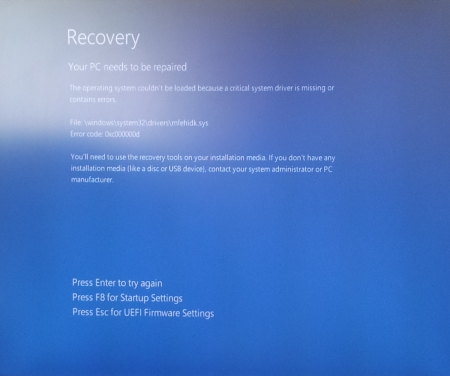
The operating system couldn’t be loaded because a critical system driver is missing or contains errors.
File: \windows\system32\drivers\mfehidk.sys
Error code: 0x000000d
The file mentioned above, Mfehidk.sys is a system process that runs in the computer background and maintains the host intrusion detection system for McAfee Antivirus. Mfehidk.sys will not be the cause of everyones boot loop or the faulting file shown.
http://h20565.www2.hp.com/hpsc/doc/public/display?sp4ts.oid=4132189&docId=mmr_kc-0110048&docLocale=en_US - says what Mfehidk.sys is for.
Stage 3
The boot loop has now gone but I could no longer use the 'Auto Repair Menu' on the hard disk so i had to revert to using a Windows 8 Boot Disk with Dart Utilities.
When the disk had loaded i navigated to the Advanced Tools via the Troubleshooting menu and ran the following (you will be prompted to login)
- Startup Repair - once this had completed it says it could not repair the startup and gave me the option of shutting down or reloading the utlities. One other piece of information it gave was the location to its Logfile.
C:\windows\System32\Logfiles\Srt\SrtTrail.txt
I rebooted the PC and Windows still did not load and went to the same blue screen with the error message on it. - SFC via Dart - This application ran and completed successfully but without finding any errors or corrupt files. Obviously windows did not load.
Logfile
So i decided i would go and have a look at this file and what the logfiles say. You can read the SRT log to see what issues are hyappening.
- boot of the windows DVD
- open the file explorer
- navigate to and open
C:\windows\System32\Logfiles\Srt\SrtTrail.txt
- read the log file and see if this tells you what is causing the startup error.
{insert my log file here} -
In my log file i was drawn to the lines
Root cause found:
---------------------------
Boot critical file c:\windows\system32\drivers\mfehidk.sys is corrupt.

Repair action: File repair
Result: Failed. Error code =  0x2
Time taken = 2781 ms

Repair action: System files integrity check and repair
Result: Failed. Error code =  0x490
Time taken = 870141 ms
- i then navigated to this file on the disk because i know that windows was now loading because it shows c:\windows\ as part of the file path and the logfile probably is right that this file is the cause.
- when i examined the file i found the file to be 0 Bytes and no wonder that windows see the file as corrupt. Because this file is not a windows system file this is why it is not fixed with SFC. There were also other similiarly named files that were most likely part of mcafee anti-virus.
- I created a temp folder and moved all the 0 Byte files into that folder.
- I now rebooted the computer
- Windows now loads, Fixed
Stage 4
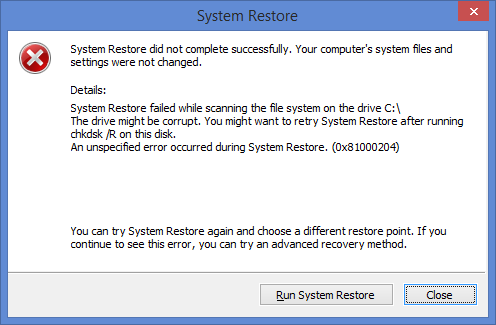
Just as a followup, when windows loaded it prompted me with a system restore error. This could of been caused by some of the work i did or that my client had been messing before the failure, even though he told me he had not. I just cancelled the notification and all was well.
Causes of the boot loop
The cause for this boot loop was undoubtably the 0 Byte files that windows was trying to load as drivers, and inparticular because it was a low level antivirus file, this was why the loop happened so quickly.
even though i tried loading windows without low level malwaredrivers i think this file was either not a low level antivirus file or when it is parsed because it is 0 Bytes long caused a hard crash of the kerenl which always flaggs the last boot as dirty, hence the loop.
The files could of been made 0 Bytes by anti-virus cleaning the file because it thinks it is a virus or perhaps when Mcaffe updated itself it did not correctely delete these files.
What should you do?
above was a worked example of what i did to fix the boot loop but here is the order of things you should do. Try rebooting your PC after each section to see if that fixed your computer.
- boot of a windows DVD and examine the log file to see if you can fix any identified issues
C:\windows\System32\Logfiles\Srt\SrtTrail.txt
- check the following folder for 0 Byte size files and remove them.
C:\windows\System32\drivers\
- Run the 'Startup Repair' tool from the windows boot disk
- Run system restore from either the windows boot disk or the onboard 'Automatic repair menu'
- Check the harddrive for issues
- chkdsk c: /r
- SMART
- full surface scan
- Try all the fixes bcdedit from
- Try the EFI repairs from - How to repair UEFI Bootloader in Windows 8 | Windows OS Hub
You should have a working PC by now, if not try going through them again to see if you have missed anything. After this the next step is to back all your stuff up and perfomr a refresh, reset or fresh install of windows.
Links
- How to repair UEFI Bootloader in Windows 8 | Windows OS Hub - I used this article as the basis for my succsessful repair
- HP Support document - HP Support Center - this article tells you what Mfehidk.sys does
- How to Fix the Automatic Repair Loop in Windows 8.1 - Microsoft Community - This is the goto article from Microsoft. You should read all of the thread.
- Automatic Repair Loop on Windows 8.1 - Microsoft Community - Tells you what bootrec commands to run
- How to repair the EFI Bootloader in Windows 8 - fixedByVonnie - a good article on how to fix this issue with pictures
- Fixing a Corrupted UEFI Partition in Windows 8 or 8.1 - A short article with the bootrec commands to run
- Total identified Windows installations: 0 - Microsoft Community - might have relevance when yoou read it
404 - The entry or revision was not found in the repository
Scenario
You have trired adding your SVN repository into your Redmine project and you get the follwing error when you try browsing the repository.
404 The entry or revision was not found in the repository

- You have set up your SVN repository in your subversion server and verified it works
- You are running your Subversion server using the https:// protocol
- You have clarified all of the settings in Redmine and all appears correct.
- Redmine is running as a windows service
- These instructions also assume that your Redmine/Subversion/NetBeans setup has been installed using my tutorials. It is not mandatory but they might make more sense with file paths.
Causes
Althought my instructions are geared towards my own setup of Redmine, Subversion and Netbeans all running on windows these solutions might work for other setups including remote Subversion servers.
If you are getting an "404 - the entry or revision was not found in the repository" error, it may be due to an invalid certificate. When we use svn (via https) in small businesses, we tend to use self-signed certificates but subversion client doesn't trust those by default. So you have to add exceptions to the ones you trust.
- Invalid SSL Certificate
- Expired SSL Certificate
- Untrusted or Self-Signed SSL Certificate
- Permissions on the Redmine service are no good
- Incorrect username and password entered in to Redmine
- There are no entries or revisions in the repository to show
Solutions
Run Redmine from the Command Console
If you run redmine from the command line (not as administrator), this runs Redmine as the currently logged in user and because of that, uses that user's Subversion SSL store and correctely handles the 'non-verified' SSL certificate if that certificate is in the current user's Subversion SSL Store
- open a command prompt (not as administrator)
- navigate to your redmine directory
- run redmine by running the following command
rails server -e production
You should find that you can now browse your reopsitory through redmine. If this works it also proves that the permissions are wrong in the redmine windows service. Although it does not directly fix the issue when running Redmine as a windows service it is a quick work around and a useful tool for testing.
Change the Redmine Windows Service Credentials
This solution worked for me.
My instructions when setting up 'Redmine as a Windows Service' configure the service to use the windows system account. This causes problems with Untrusted SSL Certificates (non-verified) because the windows system account does not have a Subversion SSL store to hold an exception and when the untrusted SSL is used this causes the Subversion binary to fail.
The solution is very easy. You need to edit the Windows Redmine Service and change the 'Log On' User. I would not use an admin account for security reasons.
- Right click on 'My Computer'
- Goto Services
- Right Click on 'Redmine Windows Service' and select properties
- Goto the 'Log On' Tab
- Select 'Log on as:'/'This Account'
- Enter your current user account details.
- You can use browse to find your user account
- If your user account does not have a password you will need to add one before you can go any further
- It should look like this when you are done

- Click apply and make sure the changes are applied
- Click OK
If you Redmine Windows Service is running, you need to stop and start it for these changes to be applied. I am also not sure if this will cause any issues with not running aas the system account.
Invalid, Expired, Untrusted or Self-Signed Certificate (non-verified)
Redmine utilises the Subversion Client Binary. This binary will not work correctly if called by Redmine when it comes across a 'non-verified' SSL certificate and no exceptions have been made for this SSL certificate.. The connection will fail and you will get the error above. So to fix this we need to add the 'non-verified' SSL to our Subversion SSL store.
- open a command prompt (not as administrator)
- enter the following command to access your repository
svn list --xml "https://svn.quantumwarp.com:18080/svn/MyITCRM"@HEAD
This will access your Subversion repository in an interactive mode and prompt you with questions if required - If the target repository's SSL certificate is 'non-verified' SSL you will get prompted with the following:
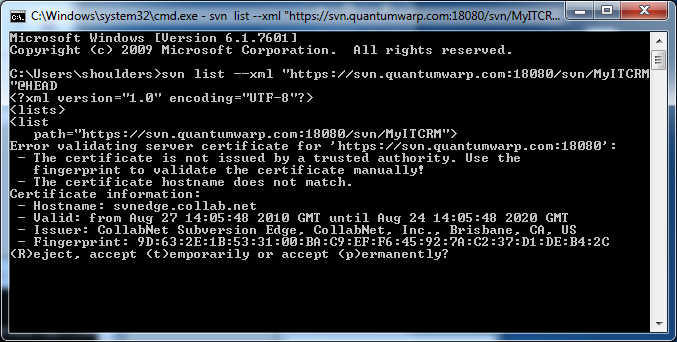
- Press 'P' for permanent and then click enter
- The binary will add the certificate to your Subversion SSL store to allow an exception to be made.
A file with a Hash for a name will be created in the folder below (assuming Windows 7)
C:\Users\shoulders\AppData\Roaming\Subversion\auth\svn.ssl.server - After the certificate and connection has been establish you might be prompted for a username and password. These are the username and password for the repository. You can enter them and allow the repository to be listed for you or you can cancell out as it is not needed to fix this issue.
Or
Another solution is just to use a Trusted SSL certificate.
Other Solutions
These solutions might not work and could be out of date. They are here so you know about them if the solutions above do not work.
- adding --trust-server-cert into <redmine root="">/lib/redmine/scm/adapters/subversion_adapter.rb
- issuing new certificate with Common Name (CN) equal to server name. (click here)
- change SVN_BIN = "svn" into SVN_BIN = "svn --trust-server-cert --tolerant-ssl --non-interactive --config-dir /tmp" - In "lib/redmine/scm/adapters/subversion_adapter.rb"
Notes
General
- Don’t forget that if you have(‘administration/settings/repositories/’Fetch commits automatically’) unticked (i.e. off), Redmine will not automatically bring up the revisions etc.. until you run a commit with a functioning hook that calls Redmine. (you could manually run the URL triggers to run the update). This setting is mainly for when you are testing and setting up the SCM interaction
SSL Stores
Netbeans, Subversion and SubversionEdge all have their own SSL stores as shown below.
- C:\Users\shoulders\AppData\Roaming\Subversion\auth\svn.ssl.server
- C:\Users\shoulders\AppData\Roaming\NetBeans\8.0.2\config\svn\config\auth\svn.ssl.server
- D:\Documents\Developer\SubversionEdge\data\svn_client_config\auth\svn.ssl.server
If you open a command prompt elevated to an administrator and run the Subversion binary, when you accept the certificate permanently the certificates will be stored in that accounts Subversion SSL store and not your currently logged in user's Subversion SSL store.
- The certificate names are the hash of the SSL
- Deleting the appropriate file from the SSL Store will remove the trusted status for that SSL certificate for that piece of software
- You can possibly move the files from one folder to another to have the same affect as accepting them permanently as they seem the same file in both of the subversion and netbeans folders.
- Having the certificate present in
C:\Users\shoulders\AppData\Roaming\Subversion\auth\svn.ssl.server
does not on its own fix the connection issue in redmine. The cert file is only created in here when you accept the fix permanently. - only the webserver process user is finally the user for the remote svn access.
http://www.redmine.org/boards/2/topics/28422?r=32903#message-32903 - The Redmine servers(Thin for versions > 2.0] by default run under the System account and this does not work wrong SSL certificate for SVN server. The solution is to change the process account for a service user with logon privilege, connect to SVN and accept permanently the certificate for that user. Don't forget to change the user for the two Thin or Mongrel services running in load balancing.
https://www.redmine.org/projects/redmine/wiki/Error_parsing_svn_output
I think what is saying don’t run the service under a system account but use a proper logon details - This issue can be is caused by running redmine under the system account and this does not use your certificate store of the logged in account.
Links
- Fixing svn module 404 error in Redmine « INFLIGHT MAGAZINE - This is a heavily referenced artilc eon how to fix this issue
- Redmine Repo 404 Error - Bitnami Community - adding --trust-server-cert
- command line - SVN - Server SSL certificate untrusted from post-commit hook - Stack Overflow - I have fixed this by issuing new certificate with Common Name (CN) equal to server name
- SVN: The entry or revision was not found in the repository. - Redmine
- FAQ - Redmine
- Defect #787: Subversion: Handle failed certificate verification - Redmine - gives svn listing command , Doesn’t work, unfortunately --trust-server-cert is only available in Subversion 1.6
- visualsvn - svn command line error "Server certificate verification failed: issuer is not trusted" how can i resolve this error? - Stack Overflow
- HakNick / Redmine + SVN (Subversion) + Certificate issue + Ubuntu - A cleanly written article
- How do you accept an SSL certificate through the SVN command line? - Server Fault
- Error parsing svn output: # - Redmine - mentions --trust-server-cert
- terminal - Why won't Subversion remember certificates? - Ask Different
- svn Error validating server certificate - Stack Overflow
Configuring a new Redmine Project integrating a Subversion Repository and configure Netbeans as the IDE
In this document I will be making a copy of the latest MyITCRM from github, then make my own project in redmine which will be linked to a Subversion repository and controlled via a NetBeans project which is my prefered IDE.
- I will have a local Subversion Server
- I will have the real files on my local xampp server so I can edit them and see the results straight away
- I will store the NetBeans metadata in a different folder so the files do not get messey
- The SVN metadata will also be stored elsewhere if there is any
It is worth reading this article - http://php.dzone.com/articles/creating-a-netbeans-php-projec
Prerequsites
- Make sure your Subversion server is running
- NetBeans is installed
- Redmine is running
- A download of the latest version of MyITCRM from github
- MyITCRM installed to an appropriate folder in the development server:
D:\Documents\websites\design\htdocs\development\myitcrm
Create a Repository in SVN
General
This is only required if you are creating your own repository or one has not already been setup.
- Log in to Collabent subversion
https://svn.quantumwarp.com:4434/csvn/ - Go to repositories tab
- Click create
- Use the name ‘MyITCRM’
- this creates a repository using MyITCRM in the path
- it does not reduce the URL to lowercase letters D:\Documents\Developer\SubversionEdge\data\repositories\MyITCRM
- It cannot be renamed later
- Select Template, with ‘Create standard trunk/branches/tags structure’, this is a standard SVN configuration
- Click create
Configure User
- Goto users tab
- Click create
- Fill in the details with a decent password and leave the default user role unless you need anything different (should just be ROLE_USER – Basic User Authority)
Configure Access Rules
These access rules are not really GUI Driven but can be accessed through the console.
https://svn.help.collab.net/entries/24785311-Define-repository-access-rules
- Got oto repositories tab
- Click on ‘Access Rules’ in the left menu
- By default all repositories are configured for read/write access by all users (not public)
[/]
* = rw
- I could restrict this to only my shoulders account to prevent unauthorised access
[/]
shoulders = rw
Configure Hooks
Once you have created your repository it is important to create a hook that tells the redmine project tracker that changes have been mnade to this repository (you can set a global lookup command that does all repositories instead)
See my other notes
Accessing the repository
From the command line
svn checkout https://svn.quantumwarp.com:18080/svn/MyITCRM/trunk MyITCRM --username shoulders
This is the hook file
@ECHO OFF

#curl http://<redmine url>/sys/fetch_changesets?id=<project identifier>&key=<your service key>
#curl "http://<redmine url>/sys/fetch_changesets?key=<your service key>"

curl "http://svn.quantumwarp.com:81/redmine/sys/fetch_changesets?id=myitcrm&key=xxxxxxxxxxxxxxxxxxxx"
#curl "http://svn.quantumwarp.com:81/redmine/sys/fetch_changesets?key=xxxxxxxxxxxxxxxxxxxx"
Notice the project identifier is all lower case, this is the identifier is the redmine one.
The access key is taken from redmine (administration/settings/repositories/’API Key’), generate a key if none is present and then populate the selected line above with the repository id (if required) and the API key.
The above code should be added to a file called post-commit.bat and placed in:
D:\Documents\Developer\SubversionEdge\data\repositories\MyITCRM\hooks
Create Project in Redmine
General
Create a new project by going in to redmine and use the following settings
- Call the project MyITCRM (the identifiers is reduce to all lowercase)
- Only enable Bug and Feature trackers
- Leave Public
- This creates a project at
http://svn.quantumwarp.com:81/redmine/projects/myitcrm
Configure Repository
- Goto the MyITCRM/settings/repositories
- Click ‘new repository’
- Fill the’New Repository’ with the following information
- SCM – subversion
- Main repository – leave ticked
- Identifier – myitcrm (only lowerc ase is allowed)
- URL - https://svn.quantumwarp.com:18080/svn/MyITCRM
- Login – shoulders
- Password - xxxxxxxxxxxxxxxxxxxxxx
currently not working, perhaps the url is not quite right or I am getting the
- Click create
Check the repository is working
Load files into the repository
Now that the blank repository has been setup you need to load the files into it. This has to be done by a SVN client and in respect of this tutorial can be done in 1 of 2 ways:
- Use tortoiseSVN to initially load the files in to the repository
- Use netbeans inbuilt client to load the files
Again this assumes that you are creating your own repository and not just connecting to one that is already live
Configure a NetBeans Project (your SVN Repository is empty)
These instructions do not involve a subversion server yet
If you have already loaded you SVN project up via tortoiseSVN or you are using a Subversion server then you should use ‘PHP Application with Existing Sources’ but select a Subversion Server as the source
---------EOF-----------
https://netbeans.org/kb/docs/php/project-setup.html - setting up a php project
https://netbeans.org/kb/docs/php/quickstart.html - php quick start
https://netbeans.org/kb/trails/php.html - PHP and HTML5 learning Trail
http://wiki.netbeans.org/ConfiguringNetBeansProjectForWordPress - similiar setup to this one
In NetBeans pressing F1 will bring up the context sensitive help page.
- Open netbeans
- Create a new project
- Select PHP
- And then an appropriate option form the list below
(I selected 'PHP Application with Existing Sources')
- ‘PHP Application’ – starting with no files
- ‘PHP Application with Existing Sources’ – use this when you already have installed a system such as wordpress or MyITCRM already on your local webserver. Same configuration options as above but will scan the folders and add them to your project and possibly import any netbeans metadata.
- ‘PHP Application from Remote Server’ - use this when you already have installed a system such as wordpress or MyITCRM already on your remote webserver. Same configuration options as above but will scan the folders and add them to your project and possibly import any netbeans metadata.
Possibly + This is where the live files are not the ones you work on but are ones that have been published.?
should look like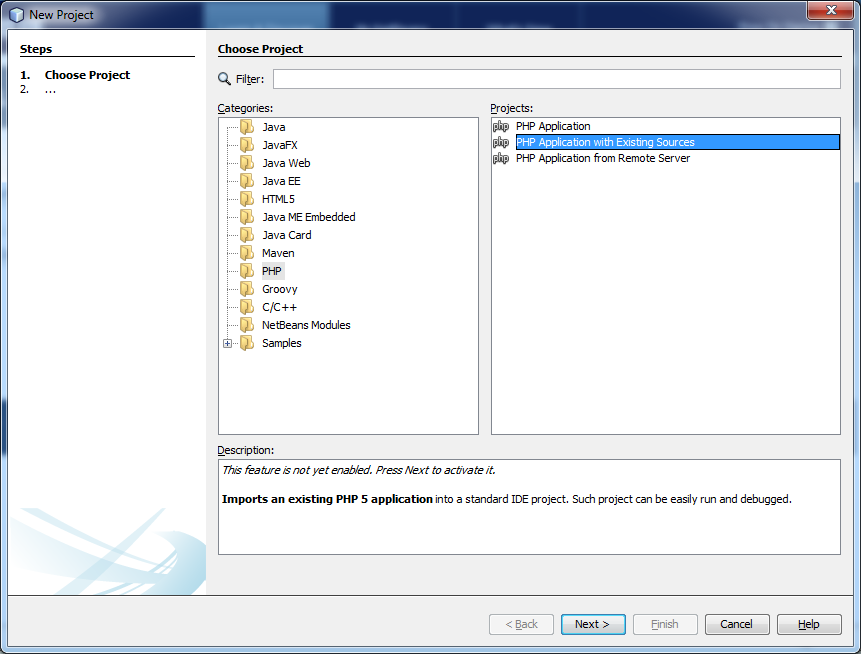
- Fill in the page ‘New PHP Project with Existing Sources’
- Set the ‘Sources Folder’, this is where your actual files are
- ‘Project Name’ give your project a name. this will default to the name of the sources folder but it is ok to change it.
- ‘PHP Version’ = The PHP version that your project uses. Note that you do not affect your PHP code by your choice in this field. Only the IDE's code completion feature uses the value in this field. Either select the latest version of PHP or the one that matched your local webserver.
- ‘Default Encoding’ – this should be left at UTF8
- Tick ‘Put NetBeans metadata into a separate directory’ – this ensures that the NetBeans metadata is not present in the live folder on the webserver. This can be very messey if they are not separate. Ignore the warning, no-one ever seems to have a problem with this and everyone ticks this feature.
should look like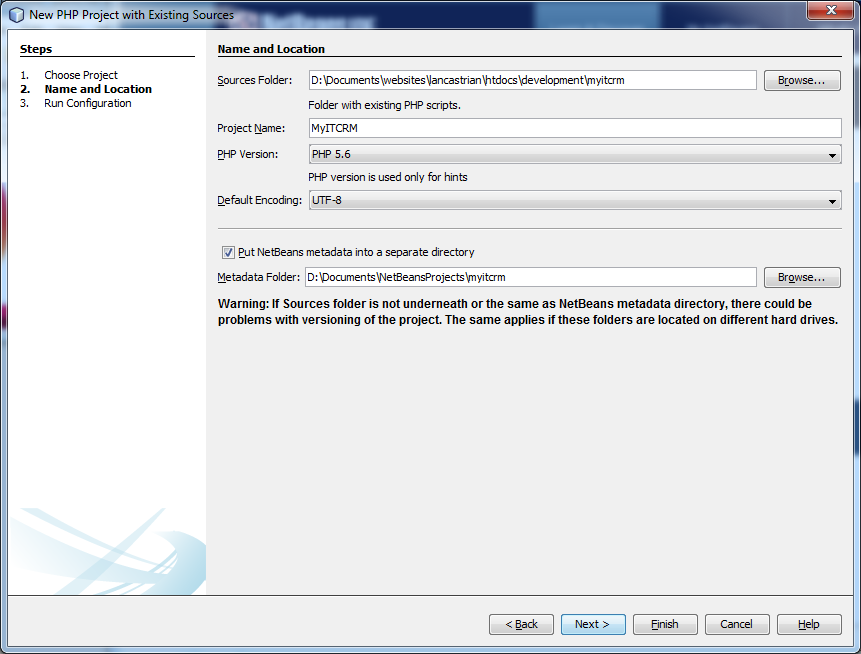
- Click next
- Configure with the following settings
- ‘Run As´- leave this as ‘Local Web Site (running on local web server)’, this is your xampp server
- ‘Project URL’ - this is the web URL of your project.
- ‘Index File’ – this is obviously the default file to load.
- ‘Copy files from Sources Folder to another location’ – not sure what I would use this for. It is not something I need
should look like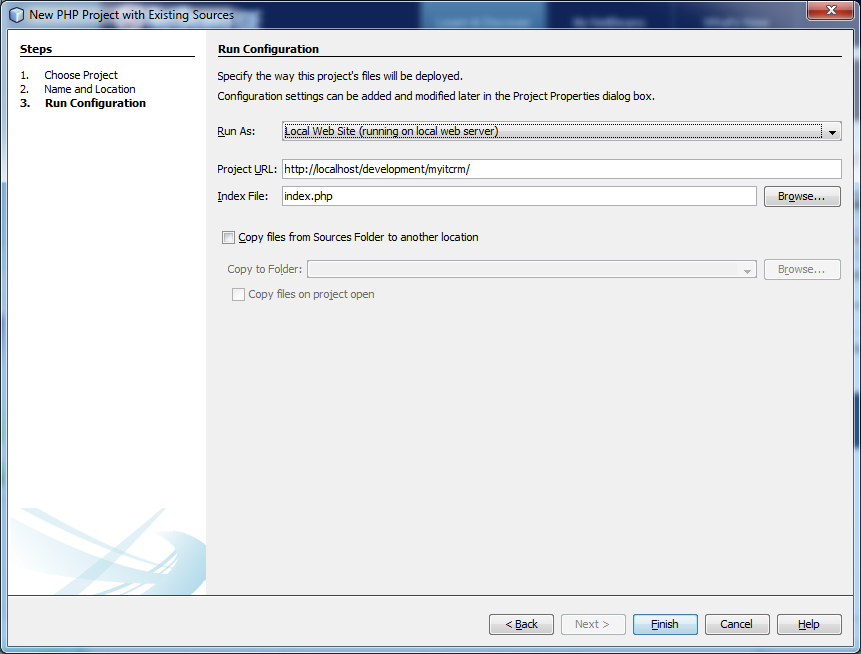
- Click finish
- If prompted to enable SMARTY support, click and enable it.
- Run any updates that are pending
Import into a subversion
- In the projects tree on the left hand side of netbeans, slect the ‘Source Files’ for your MyITCRM project
- Goto Team/subversion/’Import into Repository’
- paste in https://svn.quantumwarp.com:18080/svn/MyITCRM - the boxes will change to match this protocol
- fill in the following details
- username – shoulders
- password - xxxxxxxxxxxxxxxxxxxx
- tick ‘Save Username and Password’
- ‘Client Certificate File’ – I think this is the SSL certificate, might also be the fak Certificate Authority (CA) file – ignore this
- Passphrase – this is the passphrase for the SSL certificate – ignore this
- Ignore Proxy Configuration
should look like this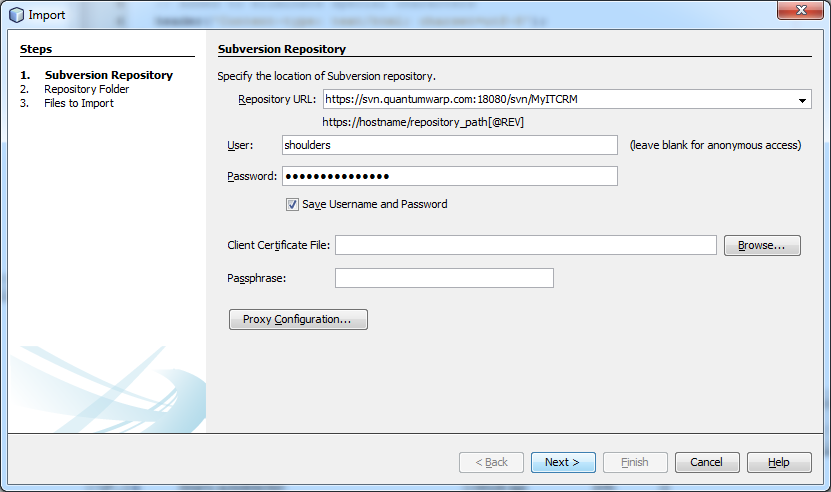
- Click next
- The Repository URL might get perverted to https://svn.quantumwarp.com:18080/svn/MyITCRM
- You will now get a SSL error about the certificate. Accept permanently.
- Click browse and select trunk
- Now enter a message eg ‘First Import’
It should now look like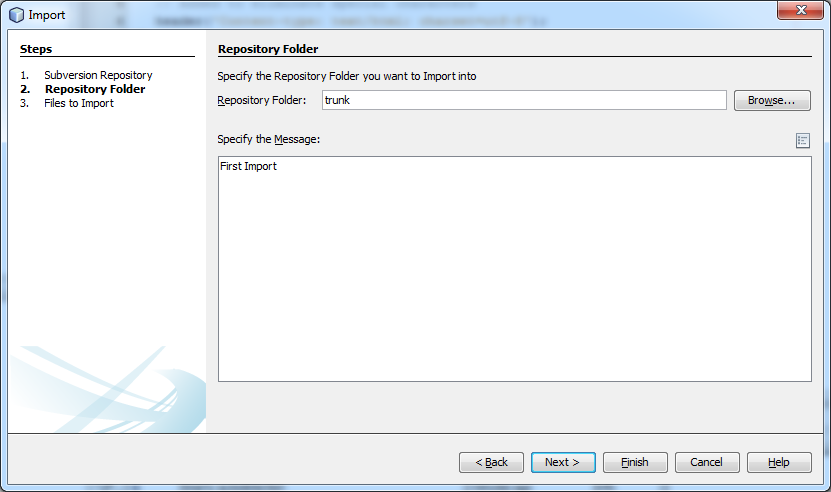
- Click next
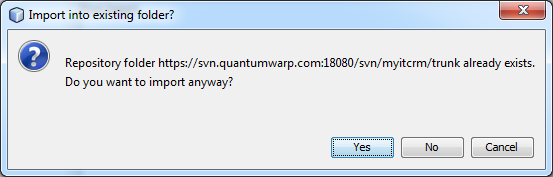
- You should get a warning about ‘Import into exisiting folder?’, click yes
- It might take a while but then you should see
- Click finish
you should now see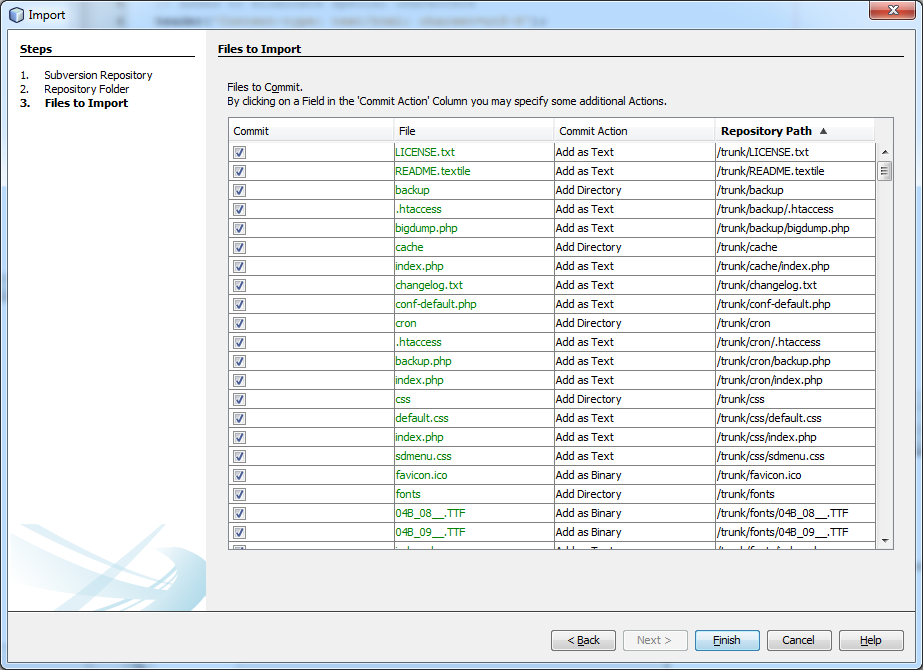
- The files are now imported in to subversion and should be connected to this project and as a consequence the team menu options have changed.
Notes
The subversion information is saved in the files, so while testing these will need deleting
Files already in Subversion Repository
- Goto Team/subversion/checkout
Using NetBeans
Ie svn when should I use trunk/branches etc… what is the difference. Should I just use the trunk if it is me or should I create my own branch.
Export Bookmarks from the AOSP Web Brower in Android
This article is 2 fold. It firstly tells you how to export your bookmarks from the AOSP browser in Android and then how to import them into Firefox. The other browsers such as Google Chome or Mozilla Firefox have a sync feature built into them and there are also apps to extract the links from these. But this article is for extracting the Bookmarks from the AOSP browser only. Once you have done this you should consider using the inbuilt sync features of the Chrome or Firefox browser.
Below are different methods based on the 2 Apps that I have used on how to export from android AOSP browser to importing them into firefox.
Bookmark Sort & Backup
This is my prefered option because of the nicely formed html file that can be imported straight into FireFox.
Download here
now on its description it says
- '*** DOES NOT WORK ON NEWER DEVICES USING CHROME AS WEB BROWSER ***'
- 'Warning: on Android 3 & 4, do not use this application if the Google Chrome bookmark synchronization is activated.'
From reading this means it willl not work on later version of android where the browser is chrome, not AOSP. it's second waring is about not using it if the syncronization was activated. well i had just installed the chrome browser and activated the sync, but i had no links in it and the backup happened fine. i would recommend uninstalling this after runnig the backup. It probably messes with the sync if you try and add things or alter them possibly.
- when run, the app then loads the links and you can see how many there are. you can also access the backup withou performing any other function.
- default location for backup export /storage/sdcard0/BookmarkSB , this can be changed
- bookmarks SB exports the bookmarks in an HTML file with all the hyperlinks working using the page title as the link name
Instructions
- Install Bookmark Sort & Backup on the Android phone
- Open the app and export links to the default location (no changes required for this)
- Copy the newly created backup file to your PC however you want
- Now select an option from below to import the files into your FireFox browser
Get Files into Firefox on your Browser
Now you have the file on your PC you have 2 options to import the links to Firefox because of the useful format it has been exported in.
Option 1
This is my prefered option because of the nicely formed html file that can be imported straight into FireFox.
- Make sure the root of your Firefox Bookmarks is empty of individual bookmarks, folders are fine. (This is the Bookmarks Menu)
- Create new folder in Firefox for the import, call it 'My Android Mobile Phone Links'
- Import directly into firefox via the 'Bookmarks / Show All Aookmarks'/Import Bookmarks from HTML'
- All files will be importe to the root of your FF bookmarks, so move these new links to the new folder
Option 2
- install a multilink opening plugin for Firefox (Snap Links Plus)
- Open the backup html file from Bookmark Sort & Backup in firefox (Drag and Drop)
- Select all links and open them
- Right click on the tabs and select 'Bookmark All' saving them into a new folder
Option 3
- Use an online URL emulator and open all of the URLs in the browser
- when all of the URLs are open, right click and slect 'Bookmark All'
Optional
To keep things clean you can delete the Bookmarks on your phone using Super Backup and use 'Remove Bookmarks' option
Super Backup : SMS & Contacts
Download here
-
This has an excellent feature to delete all bookmarks on the phone. This appears to only wipe the AOSP bookmarks, but possibly wipes Chrome, Firefox etc... but this needs checking.
- This backed up the bookmarks to an xml file, i need to see if it did them all. ie local and those at google via the AOSP browser (AOSP browesr is not chrome and is the one with the blue world icon)
- It does seem to do both local and the google ones but only supports folders in their format
- The backup can be put wherever you want but defaults to the internal SD Card in the follwoing location. It should be noted that you can swap the SD Card or device it is saved in and unless you change it it will use the same relative location on that drive.
- The XML that is created is in a proprietary format but the links are clear along with the other information if you wanted to perform any operation on them.
Instructions
- Install Super Backup : SMS & Contacts
- Backup the Bookmarks with Super Backup. This exports them in to an xml file format (proprietary format, located here....) on the SDCard
- Copy the backup XML file to your Windows PC however you want
- Scrape the bookmarks.xml to extract and convert all URLs to links and place them in a new HTML file. This can be done by some on tools or a simple PHP script
- Open the new html file in firefox
- Install a multilink selector plugin to Firefox
- Open the .html file you have just created
- Highlight and open all of the links that are displayed in your browser
- When all of the bookmarks have been opened use the 'bookmark all links' to folder option
Optional
To keep things clean you can delete the Bookmarks on your phone using Super Backup and use 'Remove Bookmarks' option
Links
- Bookmarks manager - Android Apps on Google Play
- ImportExport Browser Bookmarks â Android Apps on Google Play
- Bookmark Manager - Lite â Android Apps on Google Play
- Snap Links Plus :: Add-ons for Firefox
- Multi Links :: Add-ons for Firefox
- Google Bookmark Import Tool â Android Apps on Google Play
- How to Backup Bookmarks on Android Phone easily
- How to Sync Google Chrome Bookmarks with Your Android Phone
- Transferring Bookmarks to a New Android Phone | Business & Entrepreneurship - azcentral.com
- How to export Chrome bookmarks | Android Forums
Extract Domains Links
These might get moved to their own article
- Find URLs in Text, Make Links | CSS-Tricks - PHP Script which is easy to configure.
- URL Extractor: Find, sort, and format URLs from arbitrary text - doesnt work at last check
- Extract Domain Names from Text | Online Domain Extractor
- URL Extract Software Informer
How to extract a color from a text in Libre Office
There might be occasions where need to know the colour of a text used in a libre office document. I will show you here the different methods that i know of.
These will probably work on open office documents aswell.
Copy and Paste
- In libre office highlight the text and copy it
- open up your favourite WYSIWYG (i used JCE Editor in Ioomla)
- paste
The text is now pasted in to the wysiwyg and the hex code is contain in a <span> tag around the text for you to use.
Extract and Unzip
Most people dont know that libre office files are zip compressed and that the actual language is an xml style similiar to html if not a derivative.
- but if you use an unzip file to look at the zip'd contents of a .odt file, you'll find content.xml.
- In there will be style definitions that include colours specified in hexadecimal.
For example, from a little test file that I made:
<style:style style:name="T4" style:family="text"><style:text-properties fo:color="#008000"/></style:style>
<text:span text:style-name="T4">green</text:span>
You can then use Tools > Options > LibreOffice > Colours to add any desired colour to your GUI.
Other
- Save the document as a html file and then read the HTML code for the HEX code
- Use a windows based colour picker and just select the font you want for the colour. You might find zooming in on the text to make it larger helps you here.
Links
- User support for LibreOffice () - The extract and zip method was taken from here.
Unfortunately, Android keyboard (AOSP) has stopped
I am running Cyanogenmod 10.1.3 on my Samsung Galaxy SII (GT-I9100), and starting yesterday my keyboard continuously crashes with the following message:
Unfortunately, Android keyboard (AOSP) has stopped.
This message pops up very 10 seconds or so even when I am not trying to type. I thought it might have something to do with my recent install of the DU Speed Booster app. But after uninstalling it I still get the same problem.
This is very serious, as my phone is rendered almost completely unusable since I can't enter any text, and message keeps popping up preventing me from even doing things that only require touch.
Solution
Go to System Settings > Apps > click Android keyboard (AOSP). Clear Data. Clear Cache.
Links
Spudger and Pry Tools
These are my notes on those plastic opening tools for those fiddly phones and electronic devices that dont want to be opened.
A Spudger is also known as:
- Spludger
- Pry Tool
- Prying Tool
- Opening Tool
- Pry Bar
- Case Opening Tool
- Guitar Paddle (searching for these make a Spudger cheaper)
- Plectrum
All terms can prefixed with either: Metal / Plastic / Nylon
There are loads of different types of spudger, both plastic and metal. The most famous is the DottorPod iSesamo which is a metal blade with a plastic handle specifically designed for opening iPhones. The iSesamo requires care when being used because it is sharp metal
I have discovered that the plectrums are sold as Spludgers or pry tools as they are ideal for the job and because they are plastic they are not likely to damage your electronic goods.
Spudger - Wikipedia, the free encyclopedia
My advice, now that you know the different names of a Spludger, search on eBay and find the ones that suit your need. I found the following a good list:
- Plectrum Spludgers
- iSesamo
- Bar Style Nylon Spludger
My Desoldering Gun Research Notes
These are my notes i made while looking for decent Desoldering Gun
Desoldering Guns
- Duratool D00672 Desoldering Station
- you can buy this from CPC, eBay, Total Supplies,
- easy to buy new tips for and they are not expensive.
- EEVblog #542 - ZD985 Desoldering Station | EEVblog - Austrailian version of the D00672
- BlackJack Solderwerks BK6000 Repairing System (manual here) - a complete system but it has a gun on it. This device is also a reworked version of the Aoyue 2703A+. See my article on this device for more info.
- Aoyue 2703A+ - a decent station with a desoldering gun
- Hakko 707 - not available in the UK, these are recommended but not cheap
- Cheap Chinese Vacuum pump desolderer
- Electric Vacuum Desoldering Desolder Gun Solder Sucker - Looks like a hakko 707
- Budget through-hole desoldering station/gun? - EEVBlog Page 1 - a forum thread on this gun
Links
- Desoldering Gun Advice - EEVBlog - Page 1 - a good starting point and still gets posts.
My Multimeter Research Notes
This is my research in to multimeters
Meters
- Vichy VC99 Multimeter - autoranging - cheap
My Capacitance Meter Research Notes
This is collection of my researh on which capacitor meter i should buy.
Meters
- MESR M6013 - I bought this one, it also has a matching ESR meter the MESR 100 V2
- XC6013L - a cheap meter on ebay
- Honeytek A6013L Capacitor Tester - this apparently has an auto discharge for capacitors below 1000v (see here)
- VICHY VC6243+ - autoranging but cheap
- VICI VC6013 - another auto ranging cheap meter but looks a lot like the Vichy VC6243+, has protection and self discharge of capacitors
- Sparkpen Spark Capacitor Discharge Pen for Digitial Camera Mobile Repair Tools | eBay - this is a capacitor discharge cicuit connected to pens for easy of use